
Plotting
Generate charts directly from DataFrames. Molniya includes a zero-dependency SVG renderer and an intermediate PlotSpec format for adapter-based rendering.
Overview
const df = fromRecords(data, schema);
const plot = await df.plot();

// Generate SVG
const svg = plot.bar("month", "sales").toSVG();

// Write to file
await plot.line("x", "y", { title: "Trend" }).toFile("chart.svg");

// Get raw spec for custom rendering
const spec = plot.scatter("x", "y").toJSON();
plot()
Returns a PlotBuilder with the DataFrame's column data.
plot(): Promise<PlotBuilder>Async
plot() is async because it executes the DataFrame's pipeline via toColumns(). All lazy operators (filter, sort, etc.) are applied before chart data is extracted.
PlotBuilder
Fluent API for constructing charts. Every method returns a PlotResult.
bar(x, y, options?)
Bar chart with categorical or numeric x-axis.
bar(x: string, y: string, options?: BarOptions): PlotResult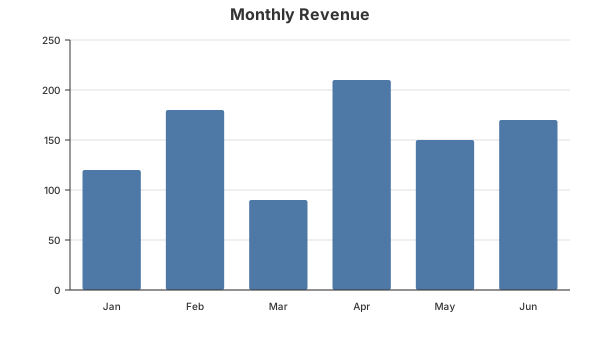
Example:
const plot = await df.plot();
const result = plot.bar("month", "revenue", {
  title: "Monthly Revenue",
  width: 800,
  height: 500,
  color: "#4e79a7"
});
await result.toFile("revenue.svg");
line(x, y, options?)
Line chart with optional point markers.
line(x: string, y: string, options?: LineOptions): PlotResult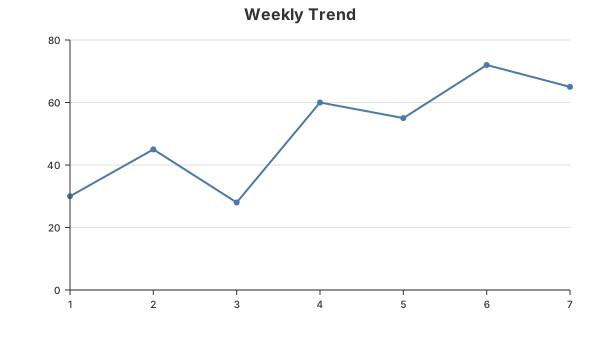
Example:
plot.line("day", "visitors", {
  title: "Daily Visitors",
  strokeWidth: 3,
  showPoints: true
});
scatter(x, y, options?)
Scatter plot for two numeric columns.
scatter(x: string, y: string, options?: ScatterOptions): PlotResult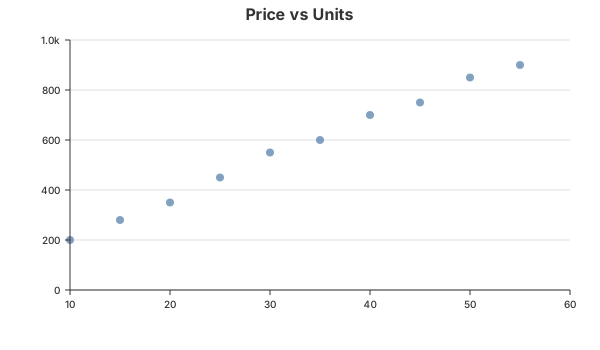
Example:
plot.scatter("price", "units_sold", {
  title: "Price vs Units",
  pointRadius: 6
});
histogram(column, options?)
Histogram that bins a single numeric column into frequency counts.
histogram(column: string, options?: HistogramOptions): PlotResult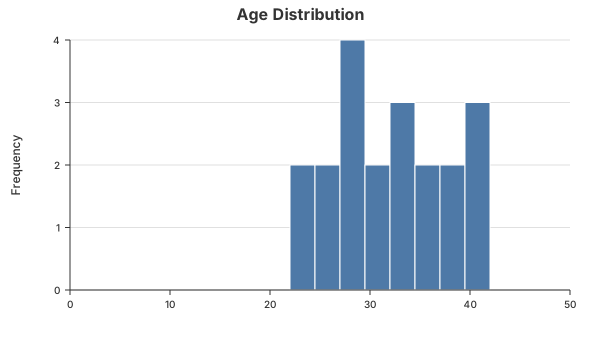
Example:
plot.histogram("age", {
  title: "Age Distribution",
  bins: 20
});
PlotResult
Returned by all PlotBuilder methods. Provides multiple output formats.
toSVG()
Render to an SVG string using the built-in zero-dependency renderer.
toSVG(): stringtoJSON()
Get the raw PlotSpec intermediate representation. Useful for custom renderers or sending to a frontend.
toJSON(): PlotSpectoFile(path)
Write SVG directly to disk.
toFile(path: string): Promise<void>toVegaLite()
Convert to a Vega-Lite specification object. Zero dependencies — produces a plain JSON spec.
toVegaLite(): VegaLiteSpecExample:
const vlSpec = plot.bar("month", "sales").toVegaLite();
console.log(JSON.stringify(vlSpec, null, 2));
// Send to a Vega-Lite renderer, embed in a web page, etc.
toVegaLiteSVG()
Render to SVG via the Vega-Lite compiler. Requires vega and vega-lite as peer dependencies.
toVegaLiteSVG(): Promise<string>Peer Dependencies
toVegaLiteSVG() dynamically imports vega and vega-lite. Install them first:
bun add vega vega-liteOptions
Common Options
All chart types accept these base options:
| Option | Type | Default | Description |
|---|---|---|---|
title | string | — | Chart title |
width | number | 800 | SVG width in pixels |
height | number | 500 | SVG height in pixels |
color | string | #4e79a7 | Primary data color |
padding | Partial<Padding> | { top: 40, right: 30, bottom: 60, left: 70 } | Chart padding |
LineOptions
| Option | Type | Default | Description |
|---|---|---|---|
strokeWidth | number | 2 | Line thickness |
showPoints | boolean | false | Show point markers |
ScatterOptions
| Option | Type | Default | Description |
|---|---|---|---|
pointRadius | number | 4 | Point size |
HistogramOptions
| Option | Type | Default | Description |
|---|---|---|---|
bins | number | 10 | Number of bins |
PlotSpec (Intermediate Format)
The PlotSpec is a renderer-agnostic JSON structure. You can consume it directly for custom integrations:
interface PlotSpec {
  type: "bar" | "line" | "scatter" | "histogram";
  data: SeriesData[];
  axes: { x: AxisSpec; y: AxisSpec };
  dimensions: { width: number; height: number };
  title?: string;
  padding: Padding;
}
This format is consumed by the built-in SVG renderer and the Vega-Lite adapter. You can also use toJSON() to feed it into any custom renderer.
Vega-Lite Adapter
The Vega-Lite adapter converts PlotSpec into a valid Vega-Lite v5 specification.
Standalone Usage
import { toVegaLiteSpec } from "molniya";

const spec = buildBarSpec(["A", "B", "C"], [10, 20, 30], { title: "Sales" });
const vlSpec = toVegaLiteSpec(spec);
// vlSpec is a valid Vega-Lite JSON object
Server-side Rendering
import { renderVegaLite } from "molniya";

// Requires: bun add vega vega-lite
const svg = await renderVegaLite(spec);
await Bun.write("chart.svg", svg);
Type Mappings
| PlotSpec Type | Vega-Lite Mark | Notes |
|---|---|---|
bar | bar | Categorical x → nominal, numeric x → quantitative |
line | line | showPoints: true produces a layered spec (line + point) |
scatter | point | pointRadius mapped to area-based size encoding |
histogram | rect | Pre-binned data with x/x2 range encoding |
Architecture
DataFrame.plot()
    ↓
PlotBuilder (fluent API)
    ↓
Chart Builder (bar/line/scatter/histogram)
    ↓
PlotSpec (neutral IR)
    ↓
┌──────────────────┐
│  Built-in SVG    │  ← zero-dep, always available
│  Vega-Lite       │  ← optional peer dep (vega + vega-lite)
│  Custom Renderer │  ← user-provided via toJSON()
└──────────────────┘