
Plotting
Generate charts directly from DataFrames using Molniya's built-in plotting module.
Quick Start
typescript
import { fromRecords, DType } from "molniya";

const df = fromRecords([
  { month: "Jan", revenue: 120 },
  { month: "Feb", revenue: 180 },
  { month: "Mar", revenue: 90 },
  { month: "Apr", revenue: 210 },
  { month: "May", revenue: 150 },
], { month: DType.string, revenue: DType.int32 });

const plot = await df.plot();
await plot.bar("month", "revenue", {
  title: "Monthly Revenue"
}).toFile("revenue.svg");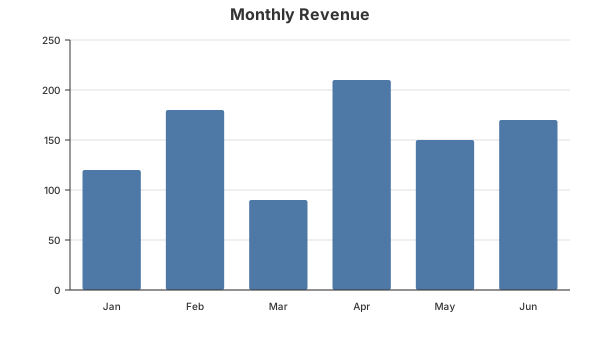
How It Works
df.plot()executes the pipeline and extracts column data- Chart methods (
bar,line,scatter,histogram) produce aPlotSpec— a renderer-agnostic JSON format toSVG()renders to SVG using the built-in zero-dependency renderertoJSON()gives you the raw spec for custom renderers
Chart Types
Bar Chart
Best for comparing categories.
typescript
const plot = await df.plot();
plot.bar("category", "value", { title: "Sales by Category" }).toSVG();
Line Chart
Best for trends over time or ordered data.
typescript
plot.line("day", "visitors", {
  title: "Daily Traffic",
  showPoints: true,
  strokeWidth: 3
}).toSVG();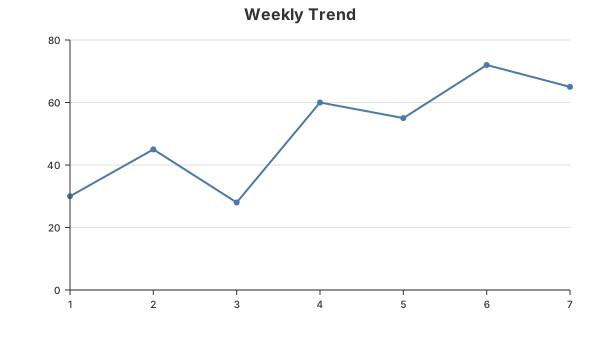
Scatter Plot
Best for showing relationships between two numeric variables.
typescript
plot.scatter("price", "quantity", {
  title: "Price vs Demand",
  pointRadius: 6
}).toSVG();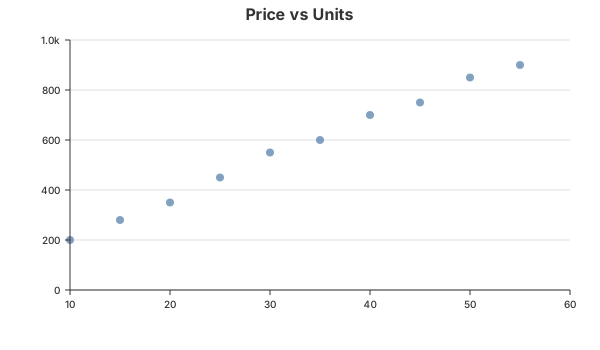
Histogram
Best for showing the distribution of a single numeric column.
typescript
plot.histogram("age", {
  title: "Age Distribution",
  bins: 15
}).toSVG();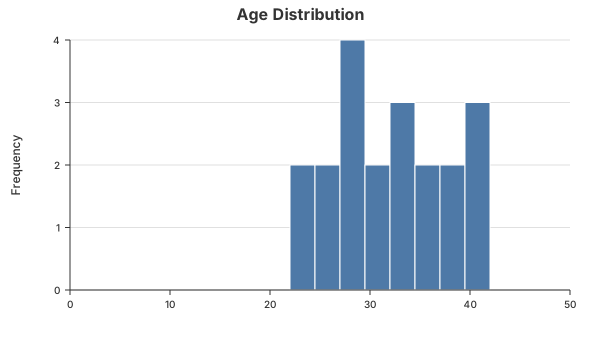
Output Formats
| Method | Returns | Use Case |
|---|---|---|
toSVG() | string | Embed in HTML, save to file |
toJSON() | PlotSpec | Feed to Vega-Lite, Plotly, or custom renderer |
toFile(path) | Promise<void> | Write SVG directly to disk |
Working with Pipelines
plot() respects the full DataFrame pipeline. Filter, sort, and transform your data before plotting:
typescript
const df = await readCsv("sales.csv", schema);

const plot = await df
  .filter(col("region").eq("APAC"))
  .select("month", "revenue")
  .sort("month")
  .plot();

await plot.line("month", "revenue", {
  title: "APAC Revenue Trend"
}).toFile("apac-trend.svg");
Customization
All chart types accept common options:
typescript
plot.bar("x", "y", {
  title: "My Chart",
  width: 1000,        // default: 800
  height: 600,        // default: 500
  color: "#e15759",   // default: "#4e79a7"
  padding: {
    top: 50,
    left: 80
  }
});
Vega-Lite Output
Every PlotResult can be converted to a Vega-Lite specification — no extra dependencies needed for the spec itself:
typescript
const vlSpec = plot.bar("month", "revenue").toVegaLite();
console.log(JSON.stringify(vlSpec, null, 2));
To render with Vega-Lite on the server, install the optional peer deps:
bash
bun add vega vega-litetypescript
const svg = await plot.bar("month", "revenue").toVegaLiteSVG();
await Bun.write("chart-vega.svg", svg);
Next Steps
- See the full API reference for all options and types
- Use
toJSON()to integrate with external visualization tools